Showing posts with label Project Life. Show all posts

Wednesday, November 4, 2015

Project Life Cards - Organization PART 2

Hello all!
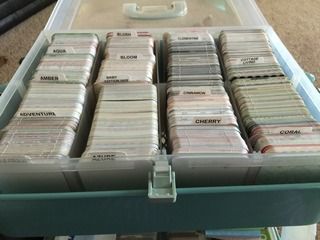
As I said in PART 1 of the organization posts, I have had a really hard time trying to find which cards would work in my page layouts.  I previously had the cards sorted and stored in Medium CTMH Organizers by kit.  Both 4x6 cards and 3x4 cards were stored together.  

It just wasn't working for me.

If you ever feel like something isn't working for you in your creative space, you change it right?  Well, I decided to take matters into my own hands and change the way I had the cards. 

I have found that I use the 3x4 cards a little more than I use the 4x6 cards.  


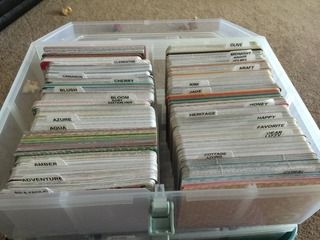
I decided to organize my cards alphabetically by kit and then by size.  The first CTMH box was used solely for 4x6 cards - alphabetically by kit name.


Half of the second CTMH box was used for the rest of the 4x6 cards I had.  

The other half of the CTMH box, I started over with the 3x4 cards.  Again, I organized the cards alphabetically by kit name.  


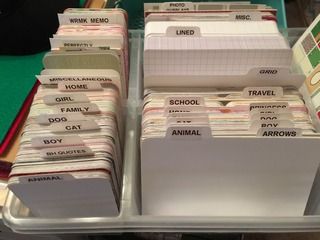
Now, I also have some themed cards from Hobby Lobby that really didn't fit into a kit but are used throughout my albums for specific trips, school functions, birthdays, etc.  I have an Antonius plastic organizer from IKEA that I used just for these kinds of cards.  It is arranged alphabetically and sorted by size as well.  I have even stored the grid and lined 3x4 and 4x6 cards in the Antonius organizer. 


I guess I will see how it all works when I get my daughter's scrapbook out and try to get some layouts done!  Wish me luck!

Until Next time,
SCRAP ON!
~Cyn~

Tuesday, November 3, 2015

Project Life Cards - Organization PART 1

I have been a busy chick lately and haven't been writing at all.

I have tried to get to work on some albums but have found that the way I am set up, I really can't find the ones I want to use quickly.  It was taking forever to find just the right card to use in my daughter's album.

A friend of mine told me about this website from a fantastic woman who has been keeping up with the PDF's of each of the kits that Becky Higgins has released in her Project Life line and has been updating it with each release!

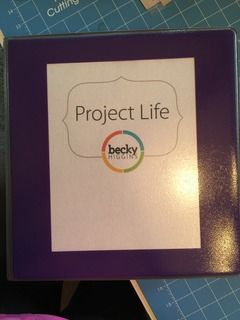
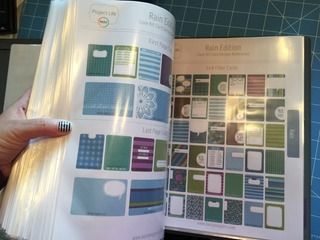
So, I saved and printed each of the PDF Files and created a project Life Binder.


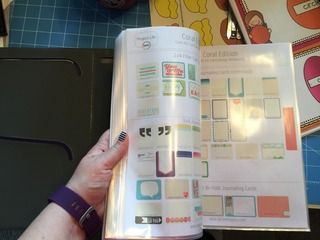
The PDF's have a picture of each of the cards that come in each kit and there is also a checklist so that you can keep track of the kits that you have.  For those of you who have a dozen or less kits, it is easy to keep track.  But for those of us who have a dozen or more to pull from, this checklist is PHENOMENAL!!!!


I used page protectors and sorted the kits alphabetically.  Now, when I work on albums, I can just flip through the book and find the proper card to suit the layout.


Pretty awesome, eh?

Until Next Time...
SCRAP ON!
~Cyn~

Sunday, October 20, 2013

Project Life - the 5 "W's" and an "H"

I hear so many people asking about Project Life.

I think it is time for a "regular plain jane" to speak up.
**I am not paid by anyone to endorse the product or even use the product. I am a scrapper (obviously you got that from the title of my blog - hahaha) and I am a stay-at-home-mom (SAHM) with a small part time job, on the side, at a local preschool.  What I am saying is that I just LOVE the product!**

So, from one "Plain Jane" to another, here is what I can tell you:

WHY?
I scrapbook for many reasons.  There are 3 things that are huge on that list of reasons:  NATHAN, SOPHIE and SANITY!  Scrapbooking is MY hobby.  It is a great way for me to relax, get creative and enjoy reminiscing about the past. But, what's more important?  My children.
They will want to know the stories behind their relatives when they are older. They want to know their own stories now.  They love to look at photos from past trips, their birth, vacations, relatives they don't see enough, etc.  This is the main reason that I scrapbook.  

WHAT?
Project Life is a KIT.  It comes with matching 4x6 decorative cards, 3x4 decorative cards for journaling.  

To complete an entire album, you will need:

  • the Core Kit
  • page protectors to slide photos, mats and journaling cards into 
  • a 3-ring 12x12 binder 
  • a black pen (acid-free, archival safe)
Project Life has taken the guesswork out of matching papers, cutting out photo mats, cutting titles and embellishing the pages.  

***side-note***
Now, don't get me wrong....if you want to embellish cards or pictures and cut titles, you can do that, but it isn't "a must-do" if you have a Project Life Core Kit.
The products shown above are:
  • Olive Core Kit
  • Midnight 3-Ring Binder
  • Big Variety Pack 2
  • Project Life Marker Set (from HSN)

WHERE?
You can purchase Project Life through HSN, Amazon, Michaels, Hobby Lobby. Michaels and Hobby Lobby (which we lovingly call it HobLob) have coupons for 40% off most weeks or even put the kits on 50% off.  If you are "unsure" if you will use it, print a coupon and go to the store to buy one!
WHO?
Use Project Life to do a scrapbook about your children.  If you don't have children, do one about YOU!  Use Project Life for a vacation.  Use it to brag about your fur-babies. Project Life is a great product to showcase LIFE....in any way, shape or form! Whether it is a heritage album, a school album, a celebration of life, a vacation of a lifetime or even the only trip you will ever take.  It works for ANYONE!  

WHEN?

A lot of people I know are just hearing about Project Life.  They aren't sure when to start it.  Here's the best part.....you can start ANY time!!!
Some people start at the beginning of January.  
Others start the beginning of the school year.  
Some have even started on a particular birthday.  
Just pick YOUR date and go for it!

HOW?
  1. You open the box, take the cellophane off 
  2. Get out all the photos you want to work with  
  3. Slide the photos and project life cards into the slots of the page protectors 
  4. Write thoughts or stories on the 3x4 or 4x6 project life cards and slide them into open spots of the page protectors.
VOILA!!!!!     It is really that easy!

So, there you have it folks, the "skinny" on Project Life. 


If you have started Project Life, drop me a line and tell me which kit you are using and what you are using it for.  I can't wait to hear all about your projects!


Until Next Time,
SCRAP ON!
~Cyn~

Sunday, October 13, 2013

Holy Cow! I did it!

I did something I have never done before....

I sent in my application to be a member of the Project Life Creative Team 2014!!!


Yep, my hands are shaking a little and I am a little bit shocked that I hit the "Send" button on my email!  

Here is what I wrote (minus the contact info of course):

"Hi there Kari!!!

I'm Cyndi M (aka Cyn)

I live in Hampton, GA but I am originally from Guelph, Ontario, Canada

Links to all things "Cyn":
Http://cynmscrappiness.blogspot.com
https://www.facebook.com/CynMCanuck
https://mobile.twitter.com/GACynM
http://www.pinterest.com/CynMCanuck/


About Me:
Married to Ben for 14 years (together 17)
2 children - Nathan -9- and  Sophie -4-
Stay at home mom
Work part time at a private preschool as a paraprofessional in the Kindergarten classroom

First PL album done in 2012 with a photo-a-day with extras thrown in when we did special trips
Second PL is being put together this year but not "photo-a-day" style but more of a monthly view.
My son is in the 4th grade and he used the cards from PL to do his INUIT scrapbook for one of his assignments.

I plan 2 scrappy retreats a year and have "enabled" plenty to use Project Life for their scrappy projects.


Project Life Photos are attached below.  I attached a few journaling samples - handwritten and typed.
I call my PL stuff "plain jane" because I don't do anything too fancy.  
I also attached a couple of my favourite layouts for "Design G" which is one of my favourite plastics that Becky came out with.


Thanks for this fabulous opportunity!!!!  I have to admit, I have never applied for anything like this before and it will be an awesome challenge for me!  I hope to hear from you soon!
~Cyn~"

I attached the following pictures to my email.


Before I had time to re-think or doubt myself, I clicked SEND.  Now, I have been on a creative team for Sketchapalooza in the past, but it was just for one class (which is a month long) and it was a lot of fun.  I enjoyed it.   But for someone as well-known as Becky Higgins and a product like Project Life, nope.  NEVER!  

So, cross your fingers and pray for a good outcome and I will know by November 20th if I have been chosen.  Wish me luck!!!!

Until Next Time,
SCRAP ON!
~Cyn~

Saturday, April 27, 2013

Flip Pal Mobile Scanner - A MUST-HAVE!!!!

I mentioned planning and attending the Skyline Retreat in March.
What I didn't mention was what I worked on while I was AT the retreat!


Usually, I have a completed "power layout" of pre-planned pages to put together.  A "power Layout" is a box of photos, paper, embellishments and journaling ideas/boxes.  Here is how it works:
  1. Get photos together that you want to scrapbook.
  2. Find matching paper to go with the photos.
  3. Find embellishments, journal spots and ideas, titles, stickers, flowers, etc. and put them with the photos and paper.
  4. Put all the items together in between the page dividers (large plastic dividers that have a file folder tab on them).
  5. Complete steps 1-4 until all the photos are gone. 
  6. Pack your bag for the retreat.
  7. Drive to the retreat.
  8. Scrapbook.
    No Power Layout for this chick! Not this time around!  
I had 4 projects that I wanted to work on while I was up there. YES, ONLY 4!  Most of the ladies that know me, know that I pack the entire scrap loft and even bring the kitchen sink, so to bring ONLY 4 PROJECTS was quite a stretch for this chick!!!  Now, the 4 projects I decided on were things that I *knew* I wouldn't be able to sit down, concentrate on and take the time needed to do them while there were 2 VERY active kidlets around.  Talk about "Mission Impossible".....

The 4 Projects:
  1. Pull apart all of Nathan's Lego Instruction booklets and laminate them in 8.5x11 sheets to put in a binder.
  2. Scan all my baby photos with my Flip Pal Mobile Scanner.
  3. Finish up my Project Life 2012 Album.
  4. Start a Power Layout for the next retreat I attend.
Well, I started with Project #1 and ran out of laminating sleeves about 1/3 of the way through.  When it is all done, though, it is going to be so great for Nathan to have them all in a binder where they can't be bent, ripped, lost or taken by Sophie.  More sleeves would be needed to finish the project.     So, I put away Project #1 and started on #2.

Project #2 was to scan in all my baby photos with my Flip Pal Mobile Scanner. 
I am now going to go off on a tangent about this amazing machine, so there's your warning!  


**********************
Mum and Dad gave me money for Christmas to purchase everyone in our family a Christmas present. I bought this cute little mobile scanner after playing with my friend Laura G's at the last Skyline Retreat - Thanks Mum and Dad!!!!

Photo is courtesy of flip-pal.com

What I did NOT know was that this itty bitty scanner would be able to scan all photos up to a 4x6 photo with the lid on it.  THEN, you can remove the lid, flip it over and scan any size of photo you want (as long as it overlaps a little) without the lid on it.  
Photo is courtesy of flip-pal.com

The scanner came with a special SD card to store the photos on after scanning them, a USB drive to plug the SD Card into so that you can download the photos to your computer using a USB slot (for those who do not have an SD Card reader built into their computer) and 4-AA batteries. Mine also came with a pink case and a special Breast Cancer Ribbon skin to go on the lid of the scanner.  It was the "Breast Cancer Awareness" bundle.  

Now, the SD Card has special "Toolbox" software loaded on it to allow you to "STITCH" the larger photos together and it was SO easy to use!  ANYONE, and I mean ANYONE, can use it!
You choose the photos that you did a multiple scan of: (this one is an 8x10 of my husband)

Then click OK. It takes the photos, stitches them all together and........     VOILA!!!    
There's BEN!!!  
I was amazed at how amazing this little machine was and then the software just blew me out of the water! 
Here's some advice for those of you just getting your hot little hands on this awesome machine:
  •  If you move the scanner at all while you are doing multiple scans of a photo, it doesn't always stitch very well.  
  • So, press the green button and then don't touch it until it is done scanning each time.  
  • An overlap is a good thing when it comes to scanning larger photos into multiple photos.
  • Invest in some rechargeable batteries to use with this machine.

I was really impressed with it.  Can't you tell??

There is 1 drawback to this machine: 
  • It is a MOBILE scanner.  

This means that it does not have an AC adapter to plug into the wall.
It takes 4 AA Batteries.  I can tell you from experience that it EATS batteries.  I made it through about 3/4 of my baby pictures before I ran out of battery power.  I used the 4 batteries it came with and some batteries I bought at the dollar general (down the mountain).  
When I returned home from the retreat and life settled back down, I invested in a charger and a set of 4 AA rechargeable batteries - Sanyo Eneloop. A great investment for the amount of scanning I am planning to do in the future.  The batteries and charger stay with the scanner and are not used for ANYTHING else but the scanner.  No little fingers grabbing my special batteries!!!  It is a great little machine and I would recommend it to anyone wanting to scan photos, documents, articles, kid's artwork, old paperwork, scrapbook pages in an album that isn't yours.  It is PHENOMENAL!!!

Now back to your regular scheduled blogging.....
**********************

Once I had eaten through all of the batteries, I had to move on from Project #2 to #3. I packed away the scanner and my baby photos and pulled out My Project Life 2012 Album.  

By this time in the weekend, it was Saturday night and I knew that there wasn't a hope at all in getting to Project #4 because I had to insert photos and journal from the end of September 2012 until the end of 2012.  That includes our trip to visit family in Canada at Christmas.  So, I packed everything that I didn't need, in my car, and just worked on sliding in all the photos, leaving slots open for journaling cards and titles.

Have I ever mentioned how hard journaling is when you are surrounded by talking people at a retreat???  I even wrote what people were saying - by accident - while I was working on my journaling.  Talk about tough!!!!  Anyway, I never did get to Project #4.

In fact, it is still waiting "in the wings" to this very day.  I am STILL working on Project Life 2012 but I am now at December 5th.  Only a little ways to go and I will be able to start to put together that Power Layout of the photos I want to "get scrappy" with.

I have YET to complete a traditional scrapbook page in 2013.  When I finish the last bit of journaling in the Project Life 2012 album, I WILL count the pages that I completed.  But NOT until I am completely done with it!

Here's hoping it is SOON!!!

Until Next Time,
SCRAP ON!
~Cyn~
Saturday, November 24, 2012

30 Days of Thankfulness: Day 24

I am thankful today to be able to scrapbook before my surgery on Monday.  My friend, Angela, came over with her daughter Megan to scrapbook with me.  It was a good day!
I went to the grocery store, CVS and the bread store early in the morning.  
I then spent half of the day going through my Project Life Album to get it caught up.
I found that I hadn't printed all the pictures I needed.  
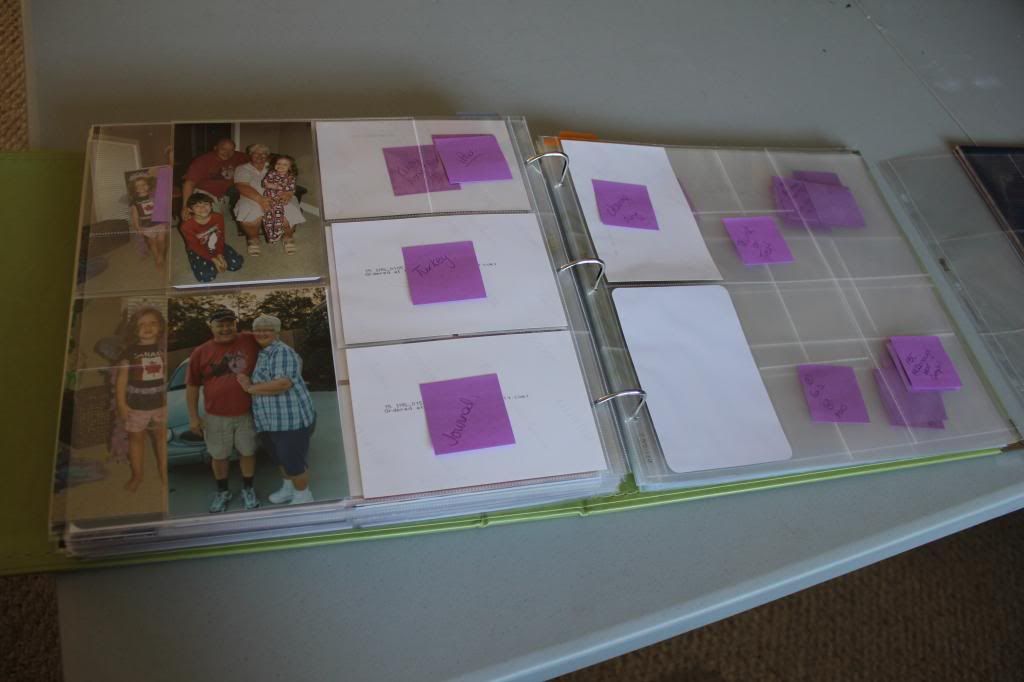
So, now, I have made a list of the photos, put them in a separate folder and will be uploading them to print! In the meantime, I have a bunch of sticky notes in the place of each photo.  This will help me to know where the photos are going to go, allow me to journal ahead of time and just slide the photos in when they get here.  
At least while I am on bedrest, I can get journaling done for the album while I wait for the photos to arrive. 
Until Next Time,
SCRAP ON!
~Cyn~

Saturday, October 20, 2012

Project Life - September 2012


Here is the latest that I have done in the Project Life Album. 
 September and October have been busy months, but I have September done up until the 19th. The pictures are printed, but this weekend at the retreat, I figured I had other things I needed to focus on.  Project Life is so EASY to keep up to date, that I can take a couple hours on the weekend and get caught up.  What scrapbooker can tell you that they can take that little time to BE CAUGHT UP? 
LOVE Project Life!


So there you have it! September 20th is the end date for now.  Next week I will finish off September, including our Family Vacation to Destin Florida!

Until Next Time,
SCRAP ON!
~Cyn~
Wednesday, October 17, 2012

Project Life Update #2 - August 2012

Here is the last month's worth of Project Life Updates that I have been working on.  I have my DSLR packed, so please excuse the grainy photos. I am using my OLD point and shoot camera and it isn't that great.  But I wanted to kind of "catch up" with my posts while I am at Skyline #10.  I have a to-do list a mile long while I am up there!


Design G Plastics are really rocking my world in this project!  I added extra journaling boxes for the last day of August because I had a longer story to tell. I love that Project Life is so versatile!
How are you doing?  What is your hiccup (if any) with Project Life?  If you haven't started Project Life, what is stopping you?  What is the hold-up?  This has been the easiest and fastest way for me to document "A Year in The Life" of our family.  You really should try it!
I am off to Skyline for my Semi-Annual Scrapbooking Retreat and I still have a bunch to do before I leave, so I am off to get packed and organized!  

Until Next Time,
SCRAP ON!
~Cyn~